
Bones in 3D - Your 3D Fracture Learning Assistant
Bones in 3D is an educational app that shows fractures and dislocations using detailed 3D CC models and animations. Built with Unity3D for iOS and Android, it helps learners visualize injury mechanisms across upper and lower limbs in a clear, interactive way.
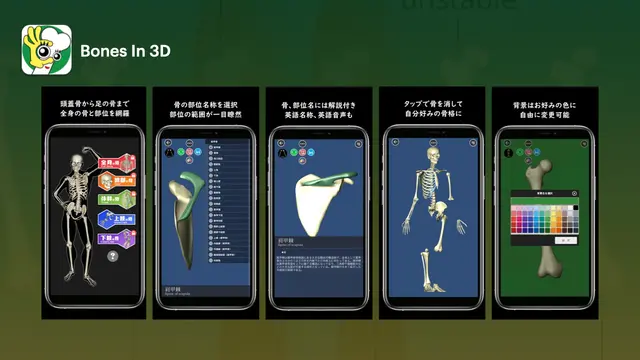
Key Features
3D Fracture Models
Explore realistic bone breaks in rotatable 3D, with clear geometry that highlights displacement, angulation, and comminution for better understanding.
Dislocation Animations
Watch step-by-step dislocation sequences that demonstrate joint misalignment, reduction concepts, and movement constraints in a simple, visual format.
Upper & Lower Limb Library
Review detailed modules for shoulder, elbow, wrist, hand, hip, knee, ankle, and foot-organized for quick access during study sessions.
Interactive Controls
Rotate, zoom, and pan models; toggle layers to see bones, joints, and fragments' positions to focus on key injury views.
Anatomical Labels
Tap labels to learn landmarks, joint surfaces, and fracture lines; build a stronger simplified and detailed view of different learning levels.
Study Mode & Notes
Use guided explanations, bookmarks, and brief quizzes to reinforce concepts over practical notes tied to specific models and animations.
Why Choose Bones in 3D?
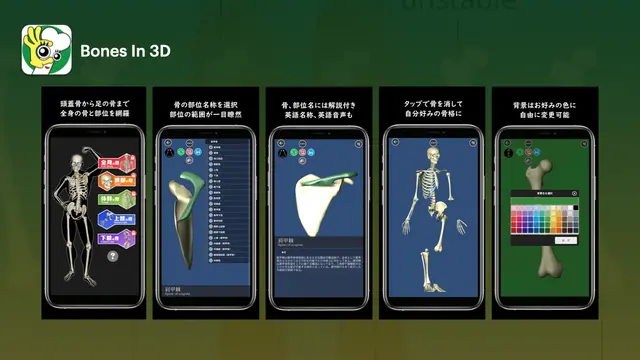
Simple cards and interactive visuals make complex anatomy easier to study, recognize, and remember.
Clean screens, quick gestures, and organized lists make studying smooth for students and learners.
Native Objective-C and Android Java deliver responsive screens and snappy navigation on a wide range of devices.
Active recall with picture matching and targeted review helps you remember names and locations longer.
Study anytime without internet; minimal permissions and on-device data help keep learning experience secure.